Hey there, future tech explorers! Welcome back to our “Sovereign AI” journey. 🚀
In our last post, we met Sarvam AI—India’s own super-digital-brain. Today, we are opening one of its coolest tools: Sarvam Vision. Think of this as the “Super Eyes” for AI. It doesn’t just look at pictures; it actually understands them, even if they are written in Indian languages!
Let’s dive into the lab and see what these magic eyes can do.
👀 What is Sarvam Vision?
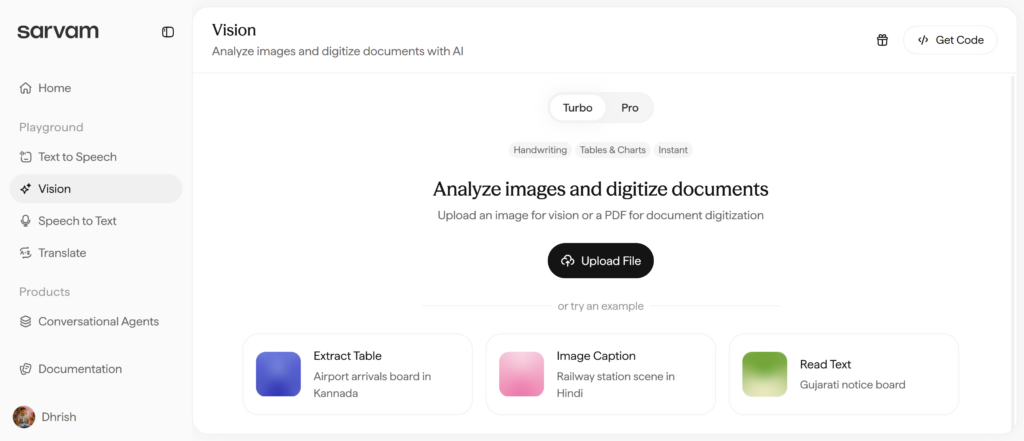
Imagine taking a photo of a messy handwritten note or a sign at a train station in a language you don’t know perfectly. Normally, your phone just sees a bunch of pixels. But Sarvam Vision reads the words, understands the tables, and can even describe the whole scene to you in a story!
This is the “Control Center” where you upload your photos to give the AI its super-sight!
🛠️ The 4 Superpowers of Sarvam Vision
Based on our experiments in the lab, here are the four main things you can do:
1. The Handwriting Decoder ✍️
Have you ever looked at a teacher’s messy notes or an old recipe and thought, “I can’t read this!”? Sarvam can.
What it does: It looks at handwriting (like Hindi proverbs on a notebook page) and turns it into clean, typed text.
Example: We gave it a page of Hindi proverbs written by hand, and it typed them out perfectly on the screen!
2. The Magic Table-Maker 📊
Sometimes information is stuck inside a photo, like a schedule on a TV screen or a menu. It’s a pain to type it all out.
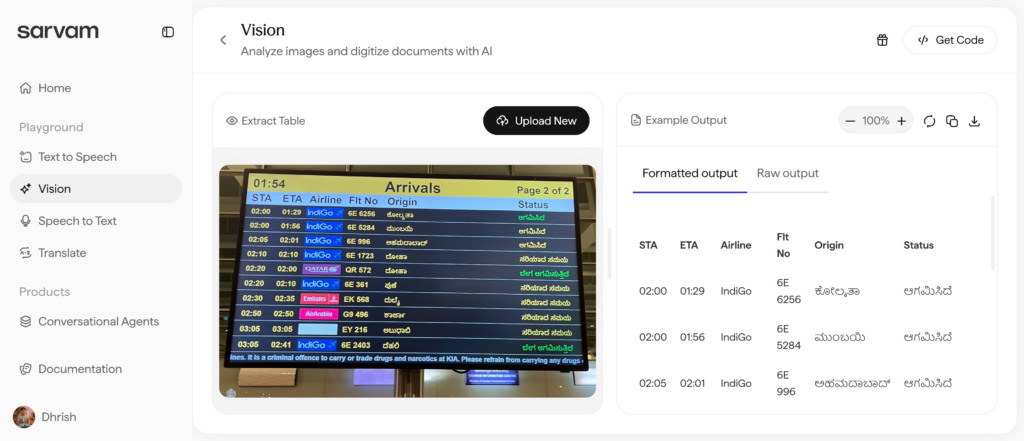
What it does: It finds rows and columns in a photo and turns them into a tidy table you can actually use.
Example: We showed it a photo of an Airport Arrival Board written in Kannada. Sarvam didn’t just read it; it organized the flight numbers, times, and cities into a beautiful list!
3. The AI Storyteller (Image Captioning) 🖼️
This is like having a friend describe exactly what’s happening in a photo.
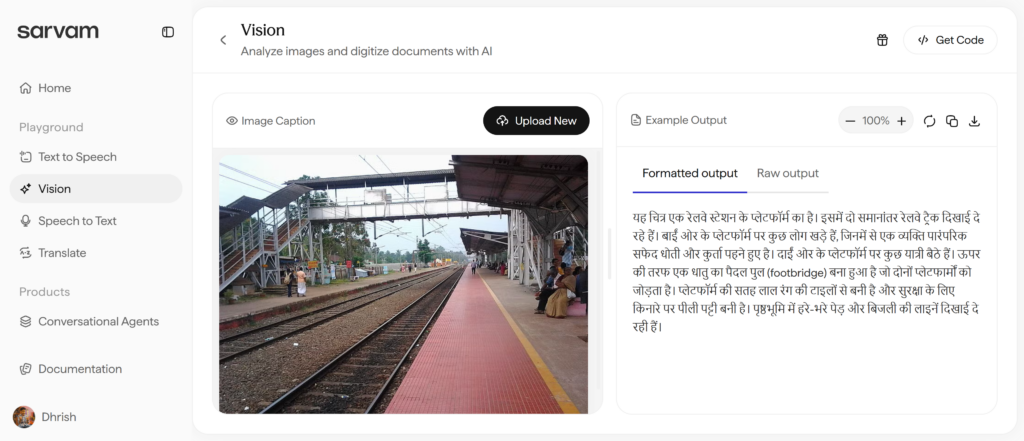
What it does: It looks at a scene and writes a detailed paragraph about what it sees.
Example: We uploaded a photo of a Railway Station. Sarvam wrote a long description in Hindi, explaining that there were two tracks, people waiting on the platform, and a yellow safety line. It’s like the AI is actually standing there!
4. The Sign Reader (Read Text) 🪧
Street signs and notice boards can be hard to read if they are far away or in a different script.
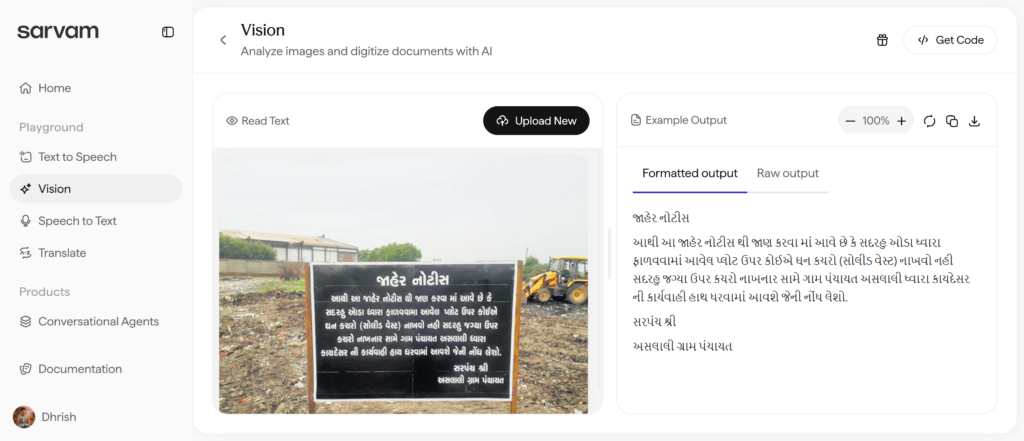
What it does: It zooms in and pulls the text off any sign.
Example: We tried a big black notice board in Gujarati. Sarvam read the whole thing and gave us the text to copy and paste.
⚡ Turbo vs. Pro: Which one do I pick?
When you use Vision, you’ll see two buttons: Turbo and Pro.
🚀 Turbo: Use this when you want an answer super fast (like reading a quick sign).
💎 Pro: Use this when the picture is really hard to read or you need the AI to be extra smart (like reading very messy handwriting).
💡 When should I use these?
If you want to…
Use this Feature!
Read your grandma’s old handwritten letters
Handwriting
Copy a lunch menu into your phone
Extract Table
Help a friend who can’t see well know what’s in a photo
Image Caption
Translate a shop sign in a new city
Read Text
🌈 Why this is so cool for India
Most AIs from other countries struggle with Indian languages like Kannada or Gujarati, especially when they are handwritten. Sarvam Vision is a local hero because it was trained specifically on Indian signs, Indian handwriting, and Indian scenes. It’s AI that finally understands our home! 🇮🇳
What’s Next?
Now that we’ve seen how Sarvam sees, in my next blog, we are going to learn how it speaks! We’ll be checking out the Text-to-Speech tools to see if we can make the AI sound like a real person.
What would you want Sarvam Vision to “look at” for you? Tell me in the comments! 👇
Note: All experiments were performed on the Sarvam AI playground. Stay tuned for more!
In the battle of the wallet, most of us carry both: a Debit Card and a Credit Card. They look identical and they both swipe the same way, but under the hood, they are powered Read more
Have you ever wanted to talk to someone in their own language, but you didn’t want to sound like a boring robot? Well, Sarvam AI has a special tool called Mayura. It’s like having a Read more
🚀 Getting Started: Your Map to Sarvam AI Imagine Sarvam AI is a giant digital toolbox built just for India. Here is how you can use your experiments to become an AI pro! 1. Step Read more


0 Comments